Virtualized dual-pane table
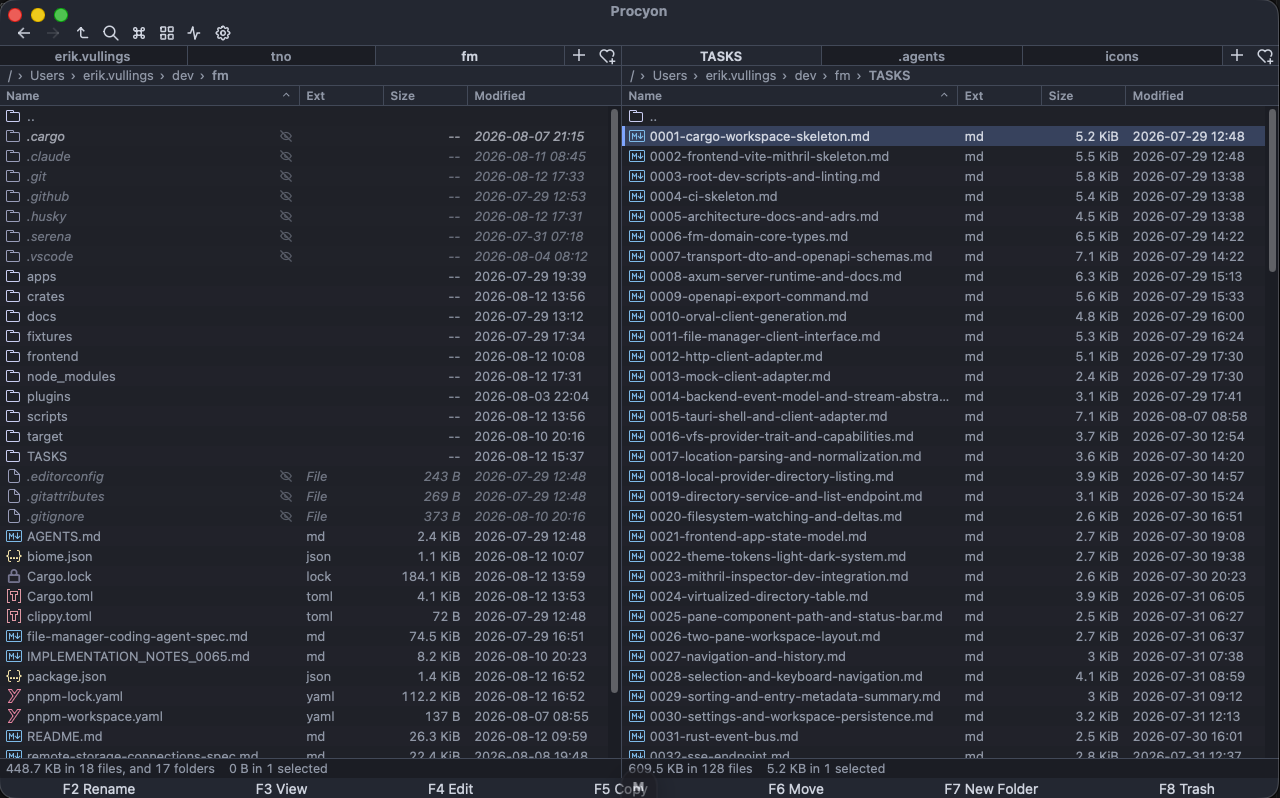
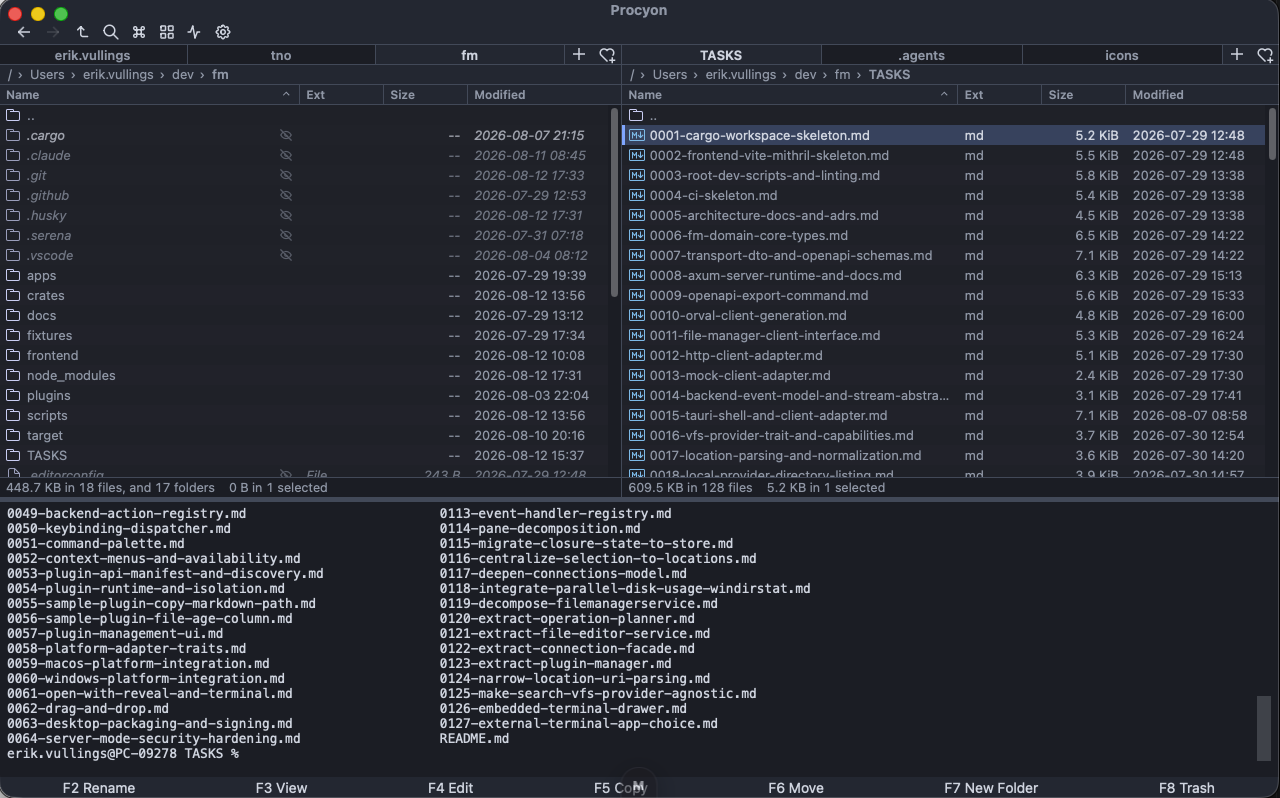
Only visible rows render, so a million-entry directory stays fluid. Draggable splitter, per-pane tabs, breadcrumb path bar, sortable columns with a git-status badge, and Ctrl/Cmd+L path editing.
Tab⌘L
Procyon (PROH-see-on) takes its name from the raccoon genus: a gatherer and collector, just as this keyboard-first file manager brings files from many places together. Local folders, archives, and SSH hosts share one dual-pane workflow, powered by a Rust operation engine and a virtualized table that holds its own at a million entries.
● Desktop builds for Windows, macOS & Linux
Run in Terminal: brew install --cask erikvullings/tap/procyon
Every mutation runs through the Rust operation engine. No filesystem writes from the UI, ever.
Only visible rows render, so a million-entry directory stays fluid. Draggable splitter, per-pane tabs, breadcrumb path bar, sortable columns with a git-status badge, and Ctrl/Cmd+L path editing.
Single files and whole trees stream through conflict-safe copy and move. Shared-destination checks kill accidental writes before they start.
Move to the OS Trash or Recycle Bin by default, then safely undo it. Permanent delete stays one deliberate, confirmed step away.
Inline F2 editing plus a batch tool with search/replace, prefix/suffix, sequence and case — live preview before you apply.
Cursor and selection stay independent, keyed by stable IDs. Invert, select-by-mask, range select, and type-to-select prefix matching.
Collect files and folders from different locations with the basket toolbar button. Open the workspace basket as a pane tab, check what you need, then copy, move, archive, checksum or delete through the normal confirmations. The basket survives a restart.
Create relative or absolute symbolic links. On Windows, choose junctions or .lnk shortcuts when supported; the dialog explains requirements before a conflict-safe operation starts.
Multiple tabs per pane, bookmarks and recent locations, saved workspaces that restore your layout — plus an Alt+F10 directory-tree sidebar with lazy expansion across every provider.
Deep filesystem search plus literal content search across files, served by a dedicated Rust search engine.
Optional local-only search, enabled with consent per folder and powered by multilingual E5 by default. Knowledge search finds relevant passages; Ask gives retrieval-augmented answers with page-level citations. EmbeddingGemma 2 is an experimental, opt-in alternative that can also index images, audio, and video; CPU-only PDF page-image indexing is capped and slow.
Fuzzy-search every action — built-in and plugin-provided — with shortcuts, availability, and parameter prompts.
Open huge text files with lazy search and syntax highlighting, inspect binaries as a hex dump, preview DOCX and PPTX documents, or explore bounded spreadsheet sheets with filtering, formulas and three-state sorting.
Preview an archive's contents, then open zip, tar and friends like folders — browse, extract and add files, including password-protected archives.
Drag between panes, onto tabs, or into Finder and Explorer. Native drops queue through the same conflict-safe engine.
Themeable icon sets with optional native macOS file-icon overlay, shipped as distributable plugins.
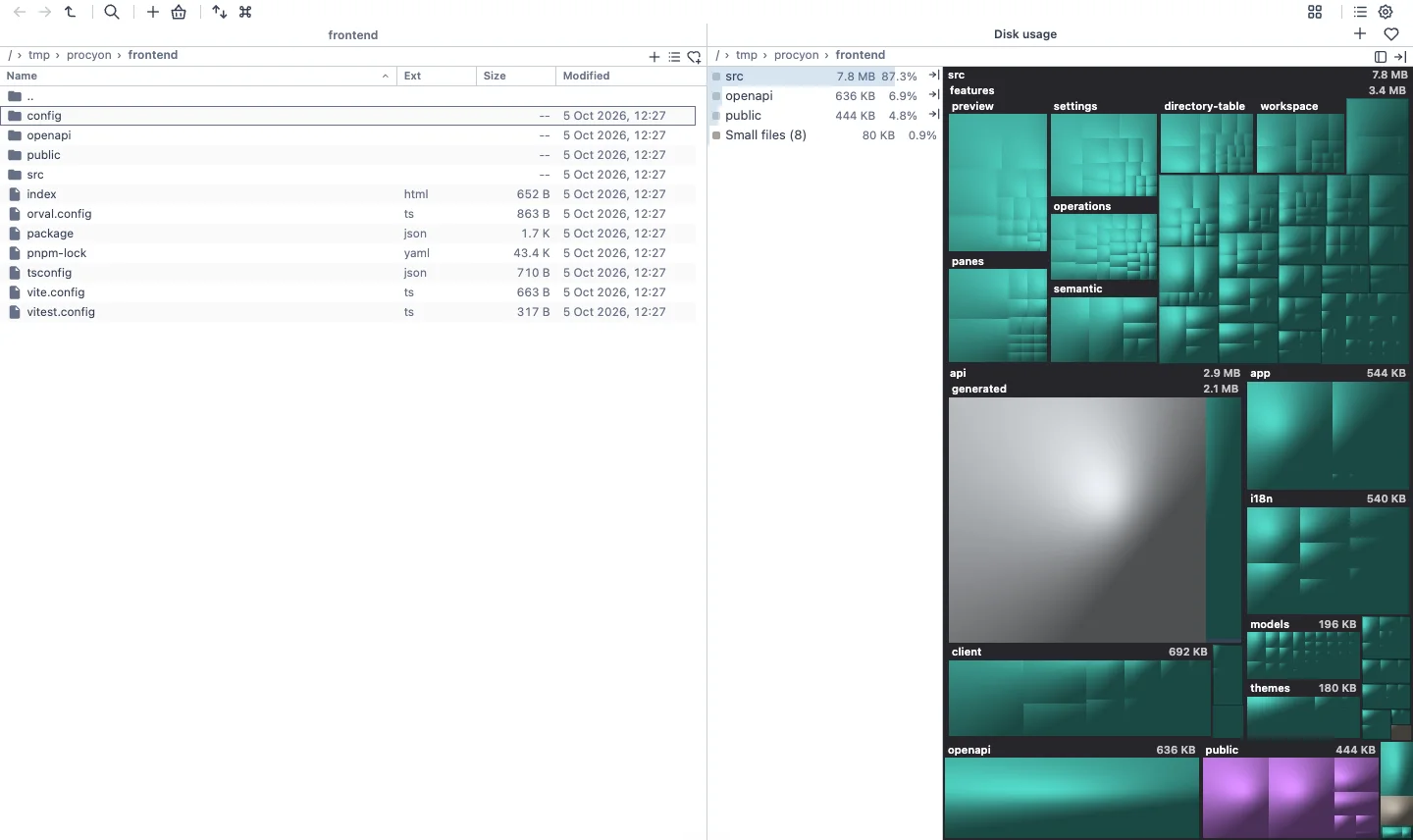
Open a local folder in either pane, then choose Disk usage from the command palette or press Ctrl/Cmd+Shift+L. Procyon scans that folder and shows its allocated space as a treemap: larger blocks use more disk space, and colours distinguish file types.
The treemap opens in the opposite pane. Select a file or folder on the map or in its item list to reveal it in the source pane; folders also zoom the treemap. Use the breadcrumb, Backspace or Escape to zoom out.
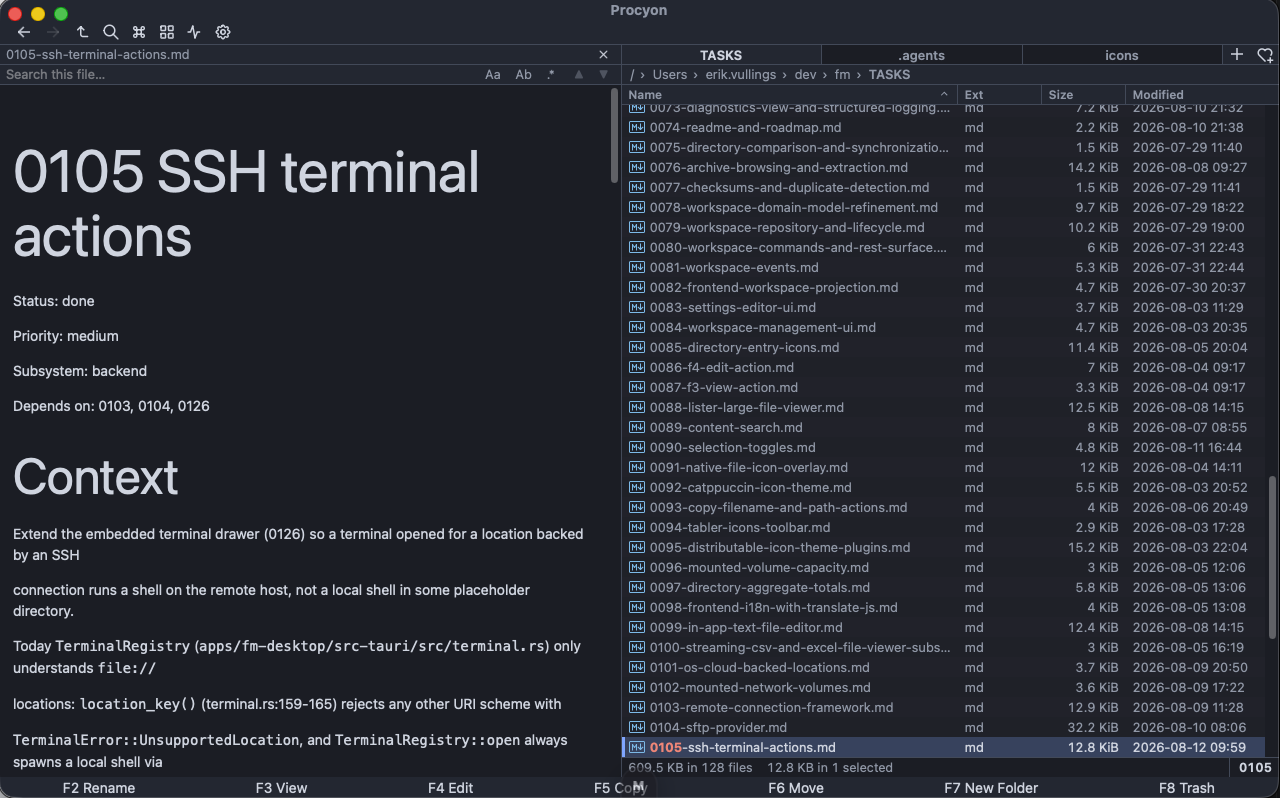
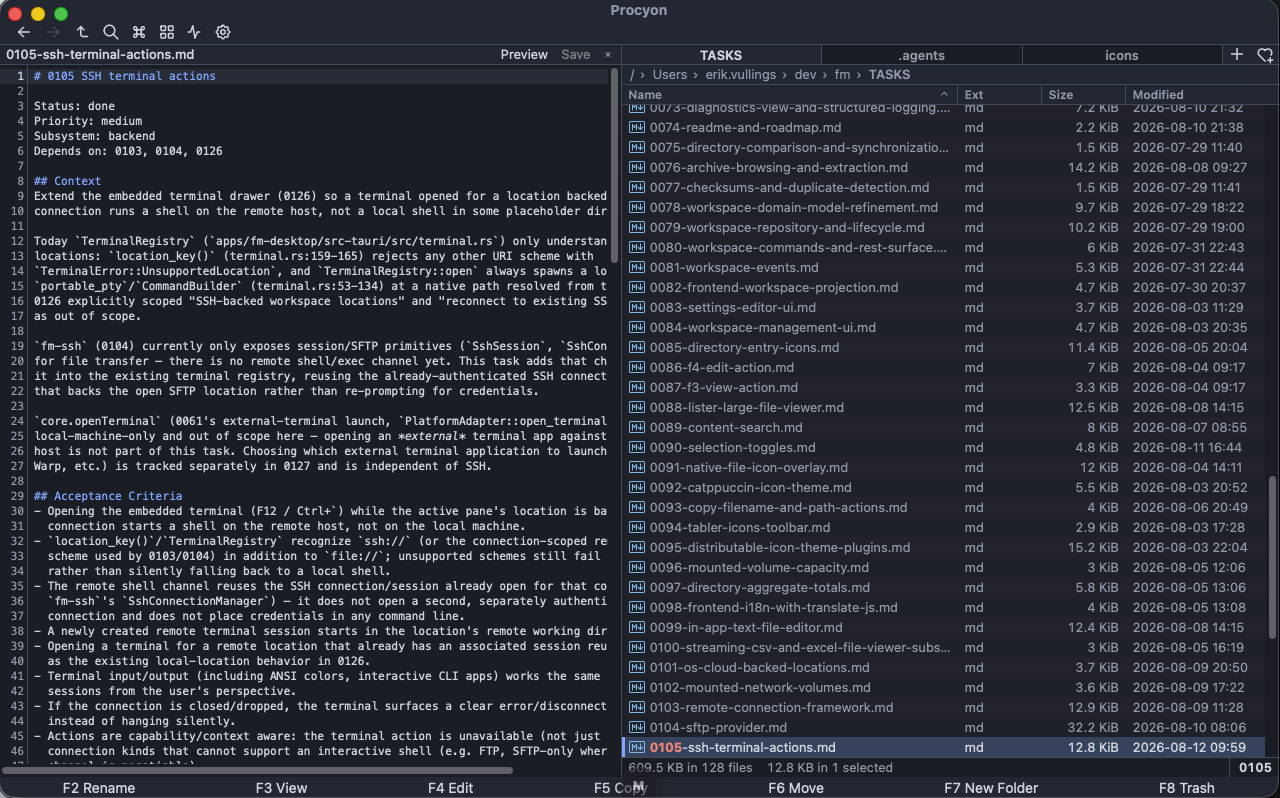
The F3 viewer opens huge files instantly with lazy search, highlights source code in 40+ languages and shows binary files as a paged hex dump. It also renders bounded DOCX, PPTX and spreadsheet previews without loading an entire document into memory, browses SQLite databases read-only with search, filters and a SQL console, and can open in its own window like a classic Lister.
Spreadsheet sheets open as compact tables with worksheet tabs, filtering, formulas, optional row numbers and sortable columns. The F4 editor edits text in-app with a Markdown preview pane.
Grid/icon view adds three icon sizes, photo-day grouping and type filtering, with image, video, PDF and CBZ/CBR thumbnails served by the backend.
The Properties dialog shows byte-precise sizes, timestamps and permissions — and aggregates totals across a multi-selection. On macOS, Finder tags and Spotlight comments round-trip with Finder itself.
Long-running work is a bounded Rust scheduler, not a spinner. Each copy, move, rename or delete is a typed job with lifecycle, progress and a smoothed transfer rate — cancellable, pausable and resumable at safe boundaries.
Conflicts resolve up front with ask, overwrite, rename-new or skip. Completed renames, moves, copies, duplicates and recoverable trash operations carry fingerprint-guarded undo plans, so later edits are never overwritten or deleted.
SFTP and FTP/FTPS roots live beside local folders in the same two-pane engine — copy local ↔ remote and remote ↔ remote streams through the exact same operation jobs, with server-native rename when both sides share a connection. Session pooling keeps transfers moving, and remote change tracking keeps the view honest.
Host keys are never auto-accepted: a changed key becomes a visible status you must explicitly confirm. Credentials stay as opaque references in your macOS Keychain or Windows Credential Manager, never in the profile itself.
The embedded terminal drawer opens a real remote shell over SSH for any location backed by a connection — no window hopping.
Plugins declare a manifest and a permission set, then contribute actions, columns and icon themes from a restricted Lua sandbox — resource-limited, diagnostics-bounded, auto-disabled after repeated failures.
Turns the current path into a clickable [text](path) link on your clipboard.
Adds a host-rendered column that shows how old each entry is, sorted by raw modification time.
contrib · columnA distributable icon theme layered over the default set, switchable from the plugin manager.
theme · iconsPlugin actions register in the same action registry as built-ins, so they arrive in the command palette and context menus automatically — with permission checks and isolation handled by fm-plugin-runtime.
Windows and macOS have native desktop integration. Linux ships as both a Debian package and portable AppImage, with the same file-management core and fewer platform-specific integrations.
brew install --cask erikvullings/tap/procyonsudo apt install ./Procyon_0.3.1_amd64.deb
Procyon is built from a Rust workspace — Axum server, Tauri 2 desktop shell, VFS providers for local, SFTP and archive storage — with a Mithril + TypeScript frontend. One OpenAPI contract drives the HTTP client, the desktop IPC and the mock runtime from a single definition.
Work is tracked task-by-task in the repo, milestone against milestone. The dual MIT / Apache-2.0 license keeps it usable anywhere you please.
Free, open source, and local-first. Install it, connect a server, and let Procyon do the gathering.